

Free
Wire up one inbox and see it work.
$0
Start free- 1 mailbox
- 500 emails / month
- 1 webhook endpoint
- 7-day event history
Connect an IMAP inbox. MailWeave parses each new message into an event your application can use, then delivers it to the endpoints you choose.
Free plan available. No card required.
A message arrives
New mail is picked up on schedule
mailbox · unread
{
  "type": "email.received",
  "data": {
    "from": "sender@example.com",
    "subject": "New message"
  }
}POST your endpoint
HMAC-SHA256
Retry and inspect every attempt
IMAP event signed POST
Use the mailbox you already have. Connect it over IMAP, select its webhook destinations and let MailWeave handle polling, parsing and delivery.
See mailbox setupAdd any IMAP mailbox. Credentials are encrypted at rest, and you can test the connection before saving.
MailWeave polls on your plan's schedule, parses each message and stores the event. Nothing is marked read until it is safely stored.
Point a webhook at your app. Each one gets its own signing secret, shown once.
Every email arrives as a signed POST. Failures retry with backoff, then land in a dead-letter list you can replay.
MailWeave extracts message headers, text and HTML bodies, reply context and attachment metadata into a structured email event.
Attachment bytes are not forwarded in event payloads.
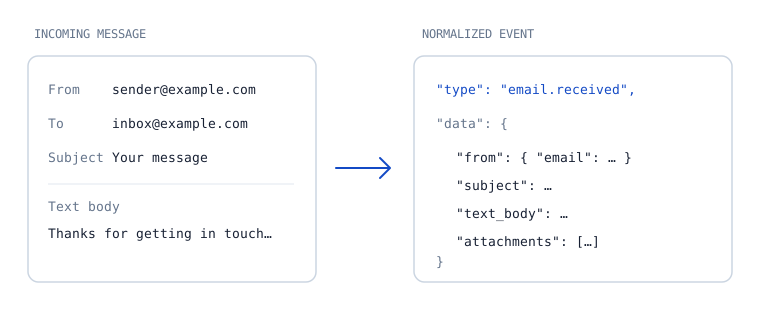
{
  "id": "550e8400-e29b-41d4-a716-446655440000",
  "type": "email.received",
  "data": {
    "from": { "email": "stripe-receipts@acme.co" },
    "subject": "Invoice #4821 paid",
    "text_body": "Thanks for your payment…",
    "attachments": [
      { "filename": "invoice-4821.pdf", "size": 48213 }
    ]
  }
}// MailPulse-Signature: t=1710000000,v1=9c1f…
const [t, v1] = header.split(",").map((p) => p.split("=")[1]);
if (Math.abs(Date.now() / 1000 - Number(t)) > 300) reject();
const expected = crypto
.createHmac("sha256", secret)
.update(`${t}.${rawBody}`)
.digest("hex");
if (!crypto.timingSafeEqual(Buffer.from(expected), Buffer.from(v1))) reject();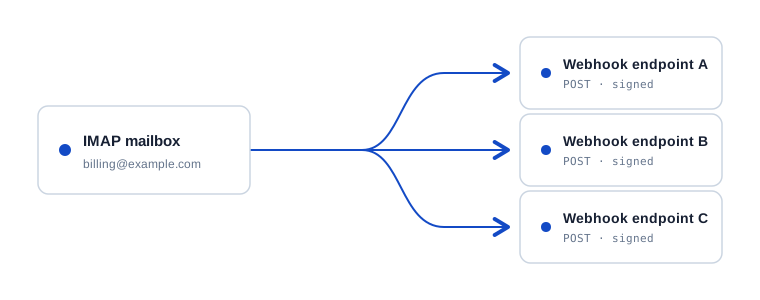
Link a mailbox to the webhooks that should receive its events. Each destination gets an independently signed delivery and its own attempt history.
Routing is configured per mailbox in your workspace.
Each delivery is signed with its endpoint secret. A successful response closes the attempt; failures retry with backoff and can be replayed from the dashboard or API.
Verify every webhook with HMAC-SHA256 and a timestamp.
Failed attempts retry with backoff and remain available to replay.
Review email volume, top senders, endpoint performance, status codes and each delivery attempt.
Start on the free plan, then compare mailbox, event, endpoint and retention limits before you upgrade.
Wire up one inbox and see it work.
$0
Start freeFor a product that depends on inbound email.
$19/ month
Start with ProShared ownership, higher volume, longer memory.
$79/ month
Start with TeamCustom volume, retention and support.
Custom
Contact salesMailWeave connects over IMAP with the credentials you provide, fetches new messages, parses them and forwards the result to your endpoints. Mailbox passwords are encrypted at rest and never returned by the API. Use an app-specific password or a dedicated inbox.
Each delivery retries with increasing delays. After the final attempt it moves to a dead-letter state, and you can replay it from the dashboard or the API when your endpoint is back.
Ingestion pauses. New mail stays unread in your inbox, so nothing is lost. It is picked up when the month resets or you upgrade.
Every request carries an HMAC-SHA256 signature over a timestamp and the raw body. Verify it with your endpoint secret and reject anything older than five minutes.
Paddle is our merchant of record. It handles checkout, tax and invoices. You can change plan, update your card or cancel from the billing page at any time.
Connect an inbox and send your first signed event downstream.